sexta-feira, dezembro 06, 2013

iOS 7 Killed Off Some Unlicensed Lightning Cables, But Here’s A Fix That Might Work For You | Cult of Mac

iOS 7 Killed Off Some Unlicensed Lightning Cables, But Here’s A Fix That Might Work For You | Cult of Mac


iOS 7 Killed Off Some Unlicensed Lightning Cables, But Here’s A Fix That Might Work For You


It’s not just you: iOS 7 has seemingly killed off support for some unlicensed, third-party Lightning cables.
We’re seeing numerous reports from users that iOS 7 has blocked support for many knock-off Lightning chargers. When you plug them in, iOS 7 will warn you that the cable is unlicensed and may not function properly, and will then fail to sync or charge. This does not appear to be universal, some cables are still working fine despite the warning. But a large number have been rendered non-functional.
I can confirm this myself. I have a short, three-headed hydra of a cable that I love to use with an external battery pack when I’m on the go: when head is a Lightning charger, the next a 30-Pin, the final one a micro-USB. Since iOS 7 officially dropped, the Lightning adapter has stopped working, while the rest of the cable syncs and charges just fine.
You might recall that when the earliest iOS 7 betas hit, iOS 7 would warn users when an unsupported Lightning cable was plugged in, but otherwise didn’t take any action. Unlicensed Lightning cables would sync and charge just fine. Starting with the GM, however, Apple has apparently started enforcing compliance with its MFi licensing program for all third-party cables… and shutting out anyone who dares to release a Lightning knock-off without paying Apple their share.
However, some devious third-parties have already figured out how to fool Apple’s detection mechanism. It’s possible that some of the unlicensed cables that still work implement this crack.
Although I have had no luck getting this to work with the third-party Lightning cable I have here, some users are having luck with this workaround:
1. Turn on USB power.
2. Plug in Lightning cable to iPhone.
3. Dismiss any warnings.
4. Unlock your iPhone.
5. Dismiss any remaining warnings.
6. Now with the screen turned on, unplug the Lightning cable.
7. Plug it back in.
8.Dismiss warning again. It should now charge.
It should be no surprise that Apple is officially ending support for third-party, unlicensed Lightning cables. The fact that counterfeit cables can now be detected using Lightning’s advanced chip detection was a major reason why Apple shifted to the standard to begin with.
Still, this is a big bummer to me, and no doubt a lot of other Apple customers. It might not be licensed, but my tri-headed hydra of a cable served me well, and there’s nothing licensed that does the same thing. Fingers crossed someone fixes this, and soon.
Is your unlicensed Lightning cable still working after the iOS 7 update? Is it broken? We’re trying to gather more data. Let us know what cable you have, and if it’s still working in the comments.

Read more at http://www.cultofmac.com/246236/ios-7-killed-off-unlicensed-lightning-cables-but-heres-a-fix-that-might-work-for-you/#F2mvBCc5P6bFSYMJ.99

segunda-feira, outubro 07, 2013

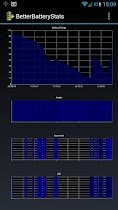
APP][2.1+][ V1.14] BetterBatteryStats

http://forum.xda-developers.com/showthread.php?t=1179809
I wrote BetterBatteryStats because I was missing the great battery history that Spare Parts allowed to call on Froyo:
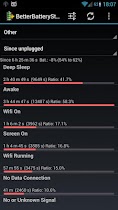
- General "other stats "overview: Awake, Deep Sleep, Screen On, Phone On, Wifi On, Wifi Running ratios
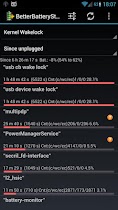
- Kernel Wakelocks
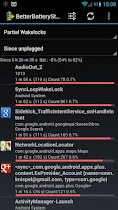
- Partial wakelocks
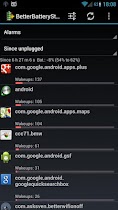
- Alarms/Wakeups
- CPU States
- Network stats
- Process stats with User and System CPU time


BetterBatteryStats is calling the "batteryinfo" service of Android to retrieve data already lying there without generating overhead.

BetterBatteryStats is focussing and has been tested on Froyo, Gingerbread, Honeycomb (3.1, thanks to daveid), ICS on different ROMs and Kernels. 

What are wakelocks and why should you care about them?
When it comes to Android the most discussed and commented topic that I know is battery drain / battery life. I'm a quite heavy user because I spend a lot of time on the train every day reading my mails, surfing and listening to music but still my phone is off for a long time during the day and while I accept the battery being drained while I use the phone I care about it draining slowly while "doing nothing".


Wakelocks or to be more precise partial wakelocks is a pattern (in fast a class) than helps devs to make sure that important pieces of their code do not get interrupted.
Basically the phone has (simplified, kernel devs don't shoot) three states:
1. awake with screen on
2. awake
3. sleeping (that's you phone favorite state)

The transitions are from (1) to (2) and finally from (2) to (3). Now as long as you use your phone it's in (1) and does not leave that state as long as you keep using it interactively. If you stop using it the phone is aiming to go to (3) as fast as possible.
And here's where wakelocks are important: as our phones as smartphones they tend to do background processing. Some of this processing is important like e.g. making a phone call, listening to music or synchronizing your contacts.
As the phone wants to go from (2) to (3) and on the other hand you don't want to hang up while you are in a call the app keeps hold of a wakelock to prevent that transisiton. When you hang up the partial wakelock gets release and here we go (the phone goes to sleep).

So partial wakelocks is a tool and it's not something that we should forbid for obvious reasons. Now there are cases when the design on an app is not real life proven (conditions of poor of no converage) and the wakelocks have negative effects because they are held unnecessarily or for too long.
BetterBatteryStats identifies these wakelocks and using your expertise or the once from our users here you can understand what happens and find a strategy to change that for the better.

Try it yourself