How to see CPU temperature on CentOS 7 and RedHat Enterprise Linux 7

You need to install Linux hardware monitoring tool called lm_sensor. This tool provides some essential command line utilities for monitoring the hardware health of Linux systems containing hardware health monitoring hardware including CPU and fan speed.
Find out your os version
$ cat /etc/centos-releaseOR
$ cat /etc/redhat-releaseSample outputs:
CentOS Linux release 7.2.1511 (Core)
Install lm_sensors package on CentOS/RHEL 7
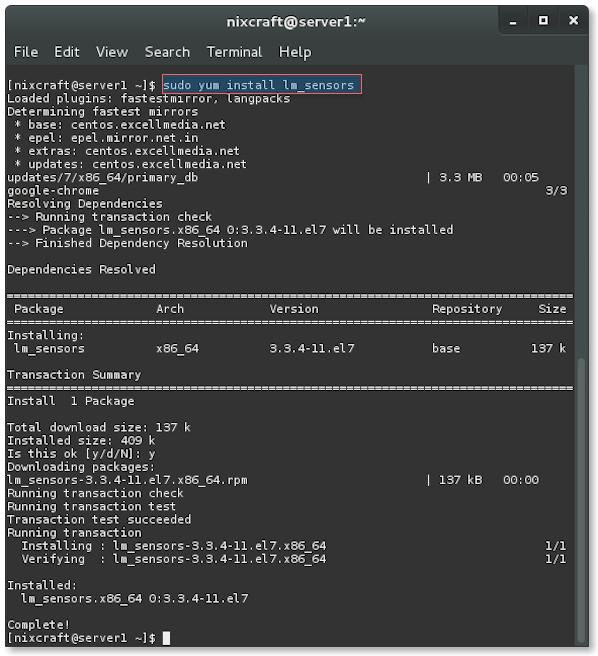
Fig.01: Installing ln_sensors on CentOS 7/RHEL 7
How to configure lm_sensors
Type the following command and say YES to all prompts:
Sample outputs:
$ sudo sensors-detectSample outputs:
# sensors-detect revision 6170 (2013-05-20 21:25:22 +0200)
# System: ADI Engineering RCC-VE [1.0]

This program will help you determine which kernel modules you need
to load to use lm_sensors most effectively. It is generally safe
and recommended to accept the default answers to all questions,
unless you know what you're doing.

Some south bridges, CPUs or memory controllers contain embedded sensors.
Do you want to scan for them? This is totally safe. (YES/no): YES
Silicon Integrated Systems SIS5595...                       No
VIA VT82C686 Integrated Sensors...                          No
VIA VT8231 Integrated Sensors...                            No
AMD K8 thermal sensors...                                   No
AMD Family 10h thermal sensors...                           No
AMD Family 11h thermal sensors...                           No
AMD Family 12h and 14h thermal sensors...                   No
AMD Family 15h thermal sensors...                           No
AMD Family 15h power sensors...                             No
AMD Family 16h power sensors...                             No
Intel digital thermal sensor...                             Success!
    (driver `coretemp')
Intel AMB FB-DIMM thermal sensor...                         No
VIA C7 thermal sensor...                                    No
VIA Nano thermal sensor...                                  No

Some Super I/O chips contain embedded sensors. We have to write to
standard I/O ports to probe them. This is usually safe.
Do you want to scan for Super I/O sensors? (YES/no): YES
Probing for `Maxim MAX6639'...                              No
Probing for `Analog Devices ADM1029'...                     No
Probing for `ITE IT8712F'...                                No
Probing for `Fintek custom power control IC'...             No
Probing for `Winbond W83791SD'...                           No
Client found at address 0x50
Probing for `Analog Devices ADM1033'...                     No
Probing for `Analog Devices ADM1034'...                     No
Probing for `SPD EEPROM'...                                 Yes
    (confidence 8, not a hardware monitoring chip)
Probing for `EDID EEPROM'...                                No

Now follows a summary of the probes I have just done.
Just press ENTER to continue:

Driver `coretemp':
  * Chip `Intel digital thermal sensor' (confidence: 9)

Do you want to overwrite /etc/sysconfig/lm_sensors? (YES/no): YES
Unloading i2c-dev... OK
How to get CPU temperature information on CentOS/RHEL 7 Linux
Type the following command:
Sample outputs:
$ sensorsSample outputs:
coretemp-isa-0000
Adapter: ISA adapter
Core 0:       +48.0°C  (high = +98.0°C, crit = +98.0°C)
Core 1:       +48.0°C  (high = +98.0°C, crit = +98.0°C)
Core 2:       +48.0°C  (high = +98.0°C, crit = +98.0°C)
Core 3:       +47.0°C  (high = +98.0°C, crit = +98.0°C)

